The quest for a better browser
I've been getting fed up with how bloated and slow Chrome has been lately, and decided to see if I could find something better.
The first stop on this journey was the DuckDuckGo browser. It's a simple shell around the system WebView, so basically It's chromium based browser. It was ok...
Pros:
- Privacy focused
- Fast lightweight
- Password manager/cloud sync - also a con... I have little trust, there have been many data breaches.
- Some ad blocking
Cons:
- It kept on "flashing" and reloading the DOM on me for no apparent reason. Wasn't unusable, but wasn't awesome.
- No extensions. None.
- Built-in AI bullshit
Not great but not terrible. Outside of the usability, the lack of extensions was irking me as I wanted more adblocking. We can do better...
Enter the Helium Browser. It's a chromium based open source browser, focused on privacy. Unlike DuckDuckGo browser, there's no revenue model based on non-targetted ads or a search engine, this browser is supported by crowdfunding and is completely open source.
Pros:
- Ad blocking built in (built-in Ublock). Blocks youtube ads, and most other ads too.
- All the Google Chrome cruft and invasive junk removed
- No data collection, no analytics
- Supports chrome extensions (and anonymizes requests to the chrome store so they can't track what extensions you install)
- No built-in AI bullshit
Cons:
- No DRM due to licensing costs. Many streaming services aren't going to work from the browser (not a deal breaker for me though, I'd probably install native apps)
- No password manager/device sync
- Only desktop, I think eventual plans for Android/IOS (I'm ok with this for now)
So the password manager is a sticking point. Since Helium supports Chrome extensions, I started looking around and found that Bitwarden is open source and is in the Chrome extensions store.
Even better, you can host your own storage backend for your password vault. This has always been a major pain point for me, I don't trust storing my stuff in clouds that I often have to pay for and often get breached.
I happen to have deep expertise in cloud engineering and security... I can do better :). So I did. A quick search in the interwebs found me the Vaultwarden project, which is a Rust implementation of the Bitwarden backend.
I'm cheap, so I wondered if I could set this up in a way that would essentially run in the AWS free tier.
Serverless Vaultwarden on AWS: Bitwarden Backend for Under $0.50/Month
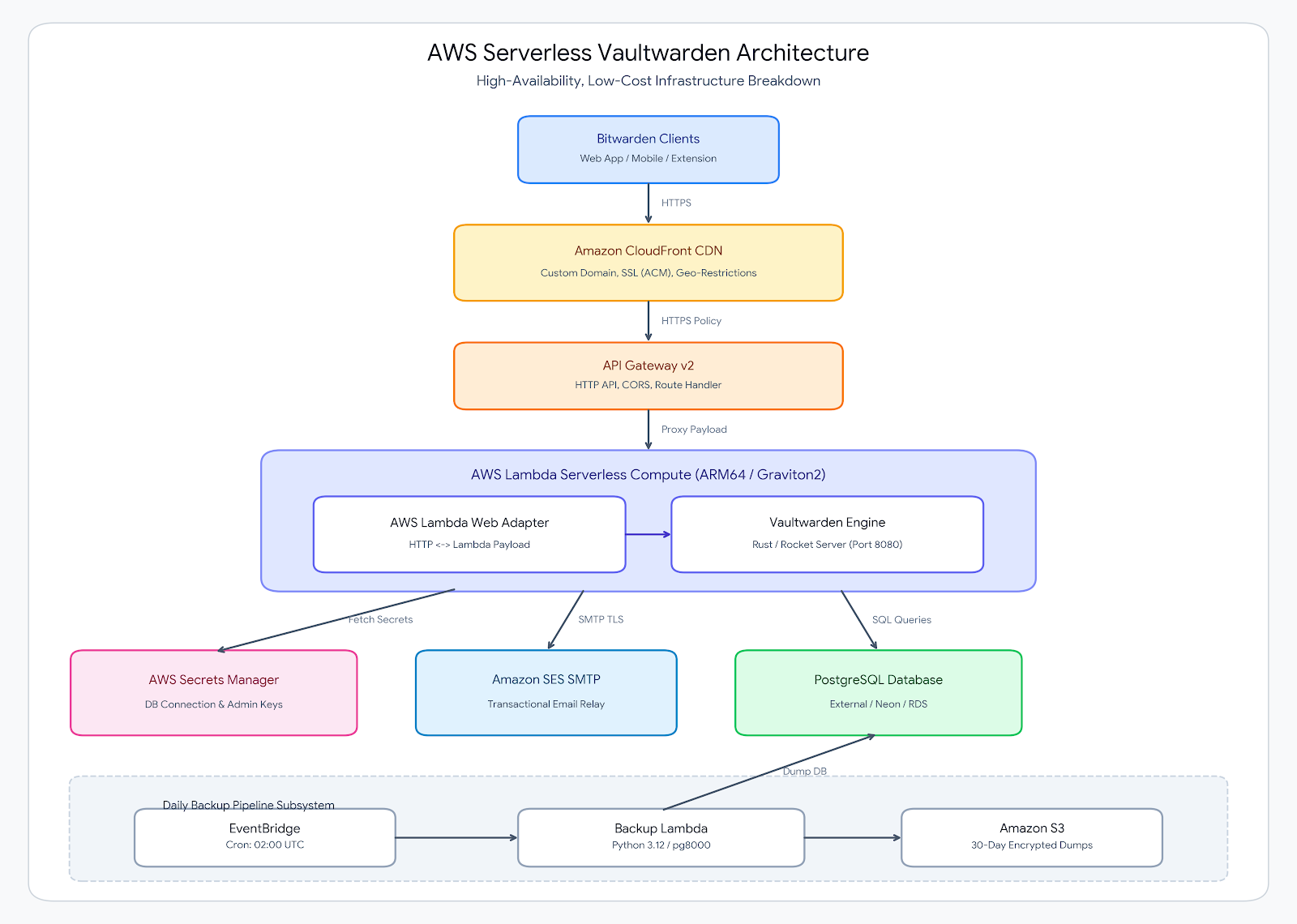
Let's dive in, we'll walk through a fully serverless, highly resilient architecture for running Vaultwarden on AWS using AWS Lambda (ARM64), AWS Lambda Web Adapter (LWA), Amazon CloudFront, HTTP API Gateway, AWS Secrets Manager, Amazon SES, and an automated S3 Database Backup Pipeline.
  1
  2
  3
  4
  5
  6
  7
  8
  9
 10
 11
 12
 13
 14
 15
 16
 17
 18
 19
 20
 21
 22
 23
 24
 25
 26
 27
 28
 29
 30
 31
 32
 33
 34
 35
 36
 37
 38
 39
 40
 41
 42
 43
 44
 45
 46
 47
 48
 49
 50
 51
 52
 53
 54
 55
 56
 57
 58
 59
 60
 61
 62
 63
 64
 65
 66
 67
 68
 69
 70
 71
 72
 73
 74
 75
 76
 77
 78
 79
 80
 81
 82
 83
 84
 85
 86
 87
 88
 89
 90
 91
 92
 93
 94
 95
 96
 97
 98
 99
100
101
102
103
104
105
106
107
108
109
110
111
112
113
114
115
116
117
118
119
120
121
122
123
124
125
126
127
128
129
130
131
132
133
134
135
136
137
138
139
140
141
142
143
144
145
146
147
148
149
150
151
152
153
154
155
156
157
158
159
160
161
162
163
164
165
166
167
168
169
170
171
172
173
174
175
176
177
178
179
180
181
182
183
184
185
186
187
188
189
190
191
192
193
194
195
196
197
198
199
200
201
202
203
204
205
206
207
208
209
210
211
212
213
214
215
216
217
218
219
220
221
222
223
224
225
226
227
228
229
230
231
232
233
234
235
236
237
238
239
240
241
242
243
244
245
246
247
248
249
250
251
252
253
254
255
256
257
258
259
260
261
262
263
264
265
266
267
268
269
270
271
272
273
274
275
276
277
278
279
280
281
282
283
284
285
286
287
288
289
290
291
292
293
294
295
296
297
298
299
300
301
302
303
304
305
306
307
308
309
310
311
312
313
314
315
316
317
318
319
320
321
322
323
324
325
326
327
328
329
330
331
332
333
334
335
336
337
338
339
340
341
342
343
344
345
346
347
348
349
350
351
352
353
354
355
356
357
358
359
360
361
362
363
364
365
366
367
368
369
370
371
372
373
374
375
376
377
378
379
380
381
382
383
384
385
386
387
388
389
390
391
392
393
394
395
396
397
398
399
400
401
402
403
404
405
406
407
408
409
410
411
412
413
414
415
416
417
418
419
420
421
422
423
424
425
426
427
428
429
430
431
432
433
434
435
436
437
438
439
440
441
442
443
444
445
446
447
448
449
450
451
452
453
454
455
456
457
458
459
460
461
462
463
464
465
466
467
468
469
470
471
472
473
474
475
476
477
478
479
480
481
482
483
484
485
486
487
488
489
490
491
492
493
494
495
496
497
498
499
500
501
502
503
504
505
506
507
508
509
510
511
512
513
514
515
516
517
518
519
520
521
522
523
524
525
526
527
528
529
530
531
532
533
534
535
536
537
538
539
540
541
542
543
544
545
546
547
548
549
550
551
552
553
554
555
556
557
558
559
560
561
562
563
564
565
566
567
568
569
570
571
572
573
574
575
576
577
578
579
580
581
582
583
584
585
586
587
588
589
590
591
592
593
594
595
596
597
598
599
600
601
602
603
604
605
606
607
608
609
610
611
612
613
614
615
616
617
618
619
620
621
622
623
624
625
626
627
628
629
630
631
632
633
634
635
636
637
638
639
640
641
642
643
644
645
646
647
648
649
650
651
652
653
654
655
656
657
658
659
660
661
662
663
664
665
666
667
668
669
670
671
672
673
674
675
|
terraform {
  required_version = ">= 1.10.0"
  required_providers {
    aws = {
      source  = "hashicorp/aws"
      version = "~> 5.0"
    }
  }
}

provider "aws" {
  alias  = "us_east_1"
  region = "us-east-1"
}

# ------------------------------------------------------------------
# Variables
# ------------------------------------------------------------------
variable "aws_region" {
  type        = string
  default     = "us-east-1"
  description = "AWS Region to deploy resources"
}

variable "app_name" {
  type        = string
  default     = "vaultwarden-serverless"
  description = "Application name prefix"
}

variable "pg_database_url" {
  type        = string
  description = "PostgreSQL Connection String"
  sensitive   = true
  nullable    = false
}

variable "admin_token" {
  type        = string
  description = "Admin token"
  sensitive   = true
  nullable    = false
}

variable "domain_name" {
  type        = string
  default     = "vw.control-alt-del.org"
  description = "Custom domain name for Vaultwarden"
}


# ------------------------------------------------------------------
# Secrets Manager (Ephemeral Storage)
# ------------------------------------------------------------------
resource "aws_secretsmanager_secret" "db_credentials" {
  name                    = "${var.app_name}-db-credentials"
  description             = "PostgreSQL connection string for ${var.app_name}"
  recovery_window_in_days = 0
}

resource "aws_secretsmanager_secret_version" "db_credentials_version" {
  secret_id = aws_secretsmanager_secret.db_credentials.id
  secret_string_wo = jsonencode({
    DATABASE_URL  = var.pg_database_url
    ADMIN_TOKEN   = var.admin_token
    SMTP_USERNAME = aws_iam_access_key.ses_smtp_key.id
    SMTP_PASSWORD = aws_iam_access_key.ses_smtp_key.ses_smtp_password_v4
  })
  secret_string_wo_version = 4
}

# ------------------------------------------------------------------
# 1. ECR Repository
# ------------------------------------------------------------------
resource "aws_ecr_repository" "vaultwarden" {
  name                 = "${var.app_name}-repo"
  image_tag_mutability = "MUTABLE"
  force_delete         = true

  image_scanning_configuration {
    scan_on_push = true
  }
}

# ------------------------------------------------------------------
# 2. IAM Execution Role & Policies
# ------------------------------------------------------------------
resource "aws_iam_role" "lambda_role" {
  name = "${var.app_name}-execution-role"

  assume_role_policy = jsonencode({
    Version = "2012-10-17"
    Statement = [{
      Action    = "sts:AssumeRole"
      Effect    = "Allow"
      Principal = { Service = "lambda.amazonaws.com" }
    }]
  })
}

resource "aws_iam_role_policy_attachment" "basic_execution" {
  role       = aws_iam_role.lambda_role.name
  policy_arn = "arn:aws:iam::aws:policy/service-role/AWSLambdaBasicExecutionRole"
}

# IAM Policy for Lambda to Read Secrets
resource "aws_iam_policy" "lambda_secrets_access" {
  name        = "${var.app_name}-lambda-secrets-policy"
  description = "Allows Lambdas to retrieve DB credentials from Secrets Manager"

  policy = jsonencode({
    Version = "2012-10-17"
    Statement = [
      {
        Effect   = "Allow"
        Action   = ["secretsmanager:GetSecretValue"]
        Resource = aws_secretsmanager_secret.db_credentials.arn
      }
    ]
  })
}

resource "aws_iam_role_policy_attachment" "lambda_secrets_attach" {
  role       = aws_iam_role.lambda_role.name
  policy_arn = aws_iam_policy.lambda_secrets_access.arn
}

data "aws_ecr_image" "vaultwarden_latest" {
  repository_name = aws_ecr_repository.vaultwarden.name
  image_tag       = "latest"

  depends_on = [
    aws_ecr_repository.vaultwarden
  ]
}

# ------------------------------------------------------------------
# 3. Optimized AWS Lambda Function (ARM64 / Postgres)
# ------------------------------------------------------------------
resource "aws_lambda_function" "vaultwarden" {
  function_name = var.app_name
  role          = aws_iam_role.lambda_role.arn
  package_type  = "Image"
  image_uri     = "${aws_ecr_repository.vaultwarden.repository_url}@${data.aws_ecr_image.vaultwarden_latest.image_digest}"
  architectures = ["arm64"]
  memory_size   = 512
  timeout       = 30

  environment {
    variables = {
      DOMAIN                       = "https://${var.domain_name}"
      SIGNUPS_ALLOWED              = "false"
      DATABASE_MAX_CONNS           = "10"
      DATABASE_MIN_CONNS           = "1"
      DATABASE_TIMEOUT             = "60"
      DATA_FOLDER                  = "/tmp/data"
      SECRET_ARN                   = aws_secretsmanager_secret.db_credentials.arn
      ROCKET_PORT                  = "8080"
      AWS_LWA_PORT                 = "8080"
      AWS_LWA_BINARY_CONTENT_TYPES = "application/wasm,application/octet-stream,image/*,font/*"
      AWS_LWA_ENABLE_COMPRESSION   = "true"
      SMTP_FROM                    = "vaultwarden@control-alt-del.org"
      SMTP_FROM_NAME               = "Vaultwarden"
      SMTP_HOST                    = "email-smtp.${var.aws_region}.amazonaws.com"
      SMTP_PORT                    = "587"
      SMTP_SECURITY                = "starttls"
    }
  }

  depends_on = [
    aws_iam_role_policy_attachment.basic_execution,
    aws_iam_role_policy_attachment.lambda_secrets_attach
  ]
}

# ------------------------------------------------------------------
# 4. API Gateway (HTTP API v2)
# ------------------------------------------------------------------
resource "aws_apigatewayv2_api" "vaultwarden_api" {
  name          = "${var.app_name}-api"
  protocol_type = "HTTP"

  cors_configuration {
    allow_origins = ["*"]
    allow_methods = ["*"]
    allow_headers = ["*"]
  }
}

resource "aws_apigatewayv2_stage" "default" {
  api_id      = aws_apigatewayv2_api.vaultwarden_api.id
  name        = "$default"
  auto_deploy = true
}

resource "aws_apigatewayv2_integration" "lambda_integration" {
  api_id                 = aws_apigatewayv2_api.vaultwarden_api.id
  integration_type       = "AWS_PROXY"
  integration_uri        = aws_lambda_function.vaultwarden.invoke_arn
  payload_format_version = "2.0"
}

resource "aws_apigatewayv2_route" "default_route" {
  api_id    = aws_apigatewayv2_api.vaultwarden_api.id
  route_key = "$default"
  target    = "integrations/${aws_apigatewayv2_integration.lambda_integration.id}"
}

resource "aws_lambda_permission" "allow_apigateway_invoke" {
  statement_id  = "AllowExecutionFromAPIGateway"
  action        = "lambda:InvokeFunction"
  function_name = aws_lambda_function.vaultwarden.function_name
  principal     = "apigateway.amazonaws.com"
  source_arn    = "${aws_apigatewayv2_api.vaultwarden_api.execution_arn}/*/*"
}

# ------------------------------------------------------------------
# 5. CloudFront Distribution Data Sources & Locals
# ------------------------------------------------------------------
locals {
  api_gw_domain = replace(aws_apigatewayv2_api.vaultwarden_api.api_endpoint, "https://", "")
}

data "aws_cloudfront_origin_request_policy" "all_viewer_except_host" {
  name = "Managed-AllViewerExceptHostHeader"
}

data "aws_cloudfront_cache_policy" "caching_optimized" {
  name = "Managed-CachingOptimized"
}

data "aws_cloudfront_cache_policy" "caching_disabled" {
  name = "Managed-CachingDisabled"
}

# ------------------------------------------------------------------
# 6. CloudFront Distribution
# ------------------------------------------------------------------
resource "aws_cloudfront_distribution" "vaultwarden_cdn" {
  enabled         = true
  is_ipv6_enabled = true
  comment         = "CloudFront distribution for ${var.app_name}"
  price_class     = "PriceClass_100"
  aliases         = [var.domain_name]
  origin {
    domain_name = local.api_gw_domain
    origin_id   = "VaultwardenApiGwOrigin"

    custom_origin_config {
      http_port              = 80
      https_port             = 443
      origin_protocol_policy = "https-only"
      origin_ssl_protocols   = ["TLSv1.2"]
    }
  }

  default_cache_behavior {
    target_origin_id       = "VaultwardenApiGwOrigin"
    viewer_protocol_policy = "redirect-to-https"
    allowed_methods        = ["GET", "HEAD", "OPTIONS", "PUT", "POST", "PATCH", "DELETE"]
    cached_methods         = ["GET", "HEAD"]

    cache_policy_id          = data.aws_cloudfront_cache_policy.caching_optimized.id
    origin_request_policy_id = data.aws_cloudfront_origin_request_policy.all_viewer_except_host.id
  }

  ordered_cache_behavior {
    path_pattern           = "/admin/*"
    target_origin_id       = "VaultwardenApiGwOrigin"
    viewer_protocol_policy = "redirect-to-https"
    allowed_methods        = ["GET", "HEAD", "OPTIONS", "PUT", "POST", "PATCH", "DELETE"]
    cached_methods         = ["GET", "HEAD"]

    cache_policy_id          = data.aws_cloudfront_cache_policy.caching_disabled.id
    origin_request_policy_id = data.aws_cloudfront_origin_request_policy.all_viewer_except_host.id
  }

  ordered_cache_behavior {
    path_pattern           = "/api/*"
    target_origin_id       = "VaultwardenApiGwOrigin"
    viewer_protocol_policy = "redirect-to-https"
    allowed_methods        = ["GET", "HEAD", "OPTIONS", "PUT", "POST", "PATCH", "DELETE"]
    cached_methods         = ["GET", "HEAD"]

    cache_policy_id          = data.aws_cloudfront_cache_policy.caching_disabled.id
    origin_request_policy_id = data.aws_cloudfront_origin_request_policy.all_viewer_except_host.id
  }

  ordered_cache_behavior {
    path_pattern           = "/identity/*"
    target_origin_id       = "VaultwardenApiGwOrigin"
    viewer_protocol_policy = "redirect-to-https"
    allowed_methods        = ["GET", "HEAD", "OPTIONS", "PUT", "POST", "PATCH", "DELETE"]
    cached_methods         = ["GET", "HEAD"]

    cache_policy_id          = data.aws_cloudfront_cache_policy.caching_disabled.id
    origin_request_policy_id = data.aws_cloudfront_origin_request_policy.all_viewer_except_host.id
  }

  ordered_cache_behavior {
    path_pattern           = "/notifications/*"
    target_origin_id       = "VaultwardenApiGwOrigin"
    viewer_protocol_policy = "redirect-to-https"
    allowed_methods        = ["GET", "HEAD", "OPTIONS", "PUT", "POST", "PATCH", "DELETE"]
    cached_methods         = ["GET", "HEAD"]

    cache_policy_id          = data.aws_cloudfront_cache_policy.caching_disabled.id
    origin_request_policy_id = data.aws_cloudfront_origin_request_policy.all_viewer_except_host.id
  }

  ordered_cache_behavior {
    path_pattern           = "*.wasm"
    target_origin_id       = "VaultwardenApiGwOrigin"
    viewer_protocol_policy = "redirect-to-https"
    allowed_methods        = ["GET", "HEAD"]
    cached_methods         = ["GET", "HEAD"]

    cache_policy_id          = data.aws_cloudfront_cache_policy.caching_optimized.id
    origin_request_policy_id = data.aws_cloudfront_origin_request_policy.all_viewer_except_host.id

    compress = true
  }

  restrictions {
    geo_restriction {
      restriction_type = "whitelist"
      locations        = ["US", "CA"]
    }
  }

  viewer_certificate {
    acm_certificate_arn      = aws_acm_certificate.vaultwarden_cert.arn
    ssl_support_method       = "sni-only"
    minimum_protocol_version = "TLSv1.2_2021"
  }
}

# ------------------------------------------------------------------
# 7. S3 Bucket for Database Backups
# ------------------------------------------------------------------
resource "aws_s3_bucket" "db_backups" {
  bucket        = "${var.app_name}-pg-backups"
  force_destroy = false
}

resource "aws_s3_bucket_public_access_block" "db_backups_privacy" {
  bucket                  = aws_s3_bucket.db_backups.id
  block_public_acls       = true
  block_public_policy     = true
  ignore_public_acls      = true
  restrict_public_buckets = true
}

resource "aws_s3_bucket_server_side_encryption_configuration" "db_backups_crypto" {
  bucket = aws_s3_bucket.db_backups.id

  rule {
    apply_server_side_encryption_by_default {
      sse_algorithm = "AES256"
    }
  }
}

resource "aws_s3_bucket_lifecycle_configuration" "db_backups_lifecycle" {
  bucket = aws_s3_bucket.db_backups.id

  rule {
    id     = "expire-old-backups"
    status = "Enabled"

    filter {}

    expiration {
      days = 30
    }
  }
}

# ------------------------------------------------------------------
# 8. IAM Role & Handler for Backup Lambda
# ------------------------------------------------------------------
resource "aws_iam_role" "backup_lambda_role" {
  name = "${var.app_name}-backup-lambda-role"

  assume_role_policy = jsonencode({
    Version = "2012-10-17"
    Statement = [{
      Action    = "sts:AssumeRole"
      Effect    = "Allow"
      Principal = { Service = "lambda.amazonaws.com" }
    }]
  })
}

resource "null_resource" "install_backup_deps" {
  triggers = {
    handler_hash = sha256(local.backup_handler_code)
  }

  provisioner "local-exec" {
    command = <<EOT
      mkdir -p ${path.module}/backup_pkg
      pip install pg8000 -t ${path.module}/backup_pkg --upgrade
    EOT
  }
}

locals {
  backup_handler_code = <<EOF
import os
import json
import gzip
import datetime
import urllib.parse
import pg8000.native
import boto3

s3_client = boto3.client('s3')
secrets_client = boto3.client('secretsmanager')

def get_db_url():
    secret_arn = os.environ['SECRET_ARN']
    response = secrets_client.get_secret_value(SecretId=secret_arn)
    secret_data = json.loads(response['SecretString'])
    return secret_data['DATABASE_URL']

def lambda_handler(event, context):
    db_url = get_db_url()
    bucket_name = os.environ['S3_BUCKET_NAME']

    parsed = urllib.parse.urlparse(db_url)
    dbname = parsed.path.lstrip('/')

    timestamp = datetime.datetime.now(datetime.timezone.utc).strftime('%Y-%m-%d_%H-%M-%S')
    file_key = f"backups/{dbname}_{timestamp}.sql.gz"
    local_path = f"/tmp/backup_{timestamp}.sql.gz"

    print(f"Connecting to database '{dbname}' on {parsed.hostname}:{parsed.port or 5432}...")

    conn = pg8000.native.Connection(
        user=parsed.username,
        password=parsed.password,
        host=parsed.hostname,
        port=parsed.port or 5432,
        database=dbname,
        ssl_context=True
    )

    tables_res = conn.run("SELECT table_name FROM information_schema.tables WHERE table_schema = 'public';")
    tables = [row[0] for row in tables_res]

    with gzip.open(local_path, 'wt', encoding='utf-8') as f:
        f.write(f"-- Postgres Backup for {dbname} at {timestamp}\n\n")
        for table in tables:
            f.write(f"\n-- Table: {table}\n")

            cols_res = conn.run(f"SELECT column_name FROM information_schema.columns WHERE table_name = '{table}';")
            cols = [f'"{c[0]}"' for c in cols_res]

            rows = conn.run(f"SELECT * FROM \"{table}\";")
            for row in rows:
                vals = []
                for val in row:
                    if val is None:
                        vals.append("NULL")
                    elif isinstance(val, (int, float)):
                        vals.append(str(val))
                    else:
                        vals.append("'" + str(val).replace("'", "''") + "'")
                f.write(f"INSERT INTO \"{table}\" ({', '.join(cols)}) VALUES ({', '.join(vals)});\n")

    conn.close()

    print(f"Uploading compressed backup to s3://{bucket_name}/{file_key}")
    s3_client.upload_file(local_path, bucket_name, file_key)

    if os.path.exists(local_path):
        os.remove(local_path)

    return {
        "statusCode": 200,
        "body": f"Successfully backed up {dbname} to {file_key}"
    }
EOF
}

resource "local_file" "backup_handler" {
  content  = local.backup_handler_code
  filename = "${path.module}/backup_pkg/handler.py"

  depends_on = [null_resource.install_backup_deps]
}

data "archive_file" "backup_lambda_zip" {
  type        = "zip"
  output_path = "${path.module}/backup_lambda.zip"
  source_dir  = "${path.module}/backup_pkg"

  depends_on = [local_file.backup_handler]
}

# ------------------------------------------------------------------
# 9. Backup Lambda Function
# ------------------------------------------------------------------
resource "aws_lambda_function" "pg_backup" {
  function_name    = "${var.app_name}-pg-backup"
  role             = aws_iam_role.backup_lambda_role.arn
  runtime          = "python3.12"
  handler          = "handler.lambda_handler"
  filename         = data.archive_file.backup_lambda_zip.output_path
  source_code_hash = data.archive_file.backup_lambda_zip.output_base64sha256

  architectures = ["arm64"]
  memory_size   = 512
  timeout       = 300

  layers = []

  environment {
    variables = {
      SECRET_ARN     = aws_secretsmanager_secret.db_credentials.arn
      S3_BUCKET_NAME = aws_s3_bucket.db_backups.id
    }
  }
}

resource "aws_iam_policy" "backup_lambda_policy" {
  name        = "${var.app_name}-backup-policy"
  description = "Allows backup Lambda to write to S3 backup bucket, fetch Secrets, and CloudWatch logs"

  policy = jsonencode({
    Version = "2012-10-17"
    Statement = [
      {
        Effect   = "Allow"
        Action   = ["s3:PutObject", "s3:PutObjectAcl"]
        Resource = "${aws_s3_bucket.db_backups.arn}/*"
      },
      {
        Effect   = "Allow"
        Action   = ["secretsmanager:GetSecretValue"]
        Resource = aws_secretsmanager_secret.db_credentials.arn
      },
      {
        Effect = "Allow"
        Action = [
          "logs:CreateLogGroup",
          "logs:CreateLogStream",
          "logs:PutLogEvents"
        ]
        Resource = "arn:aws:logs:*:*:*"
      }
    ]
  })
}

resource "aws_iam_role_policy_attachment" "backup_attach" {
  role       = aws_iam_role.backup_lambda_role.name
  policy_arn = aws_iam_policy.backup_lambda_policy.arn
}

# ------------------------------------------------------------------
# 10. Scheduled Trigger (EventBridge)
# ------------------------------------------------------------------
resource "aws_cloudwatch_event_rule" "daily_backup_schedule" {
  name                = "${var.app_name}-daily-backup-rule"
  description         = "Triggers PostgreSQL backup Lambda daily at 02:00 AM UTC"
  schedule_expression = "cron(0 2 * * ? *)"
}

resource "aws_cloudwatch_event_target" "trigger_pg_backup" {
  rule      = aws_cloudwatch_event_rule.daily_backup_schedule.name
  target_id = "TriggerPGBackupLambda"
  arn       = aws_lambda_function.pg_backup.arn
}

resource "aws_lambda_permission" "allow_eventbridge_to_invoke_backup" {
  statement_id  = "AllowExecutionFromEventBridge"
  action        = "lambda:InvokeFunction"
  function_name = aws_lambda_function.pg_backup.function_name
  principal     = "events.amazonaws.com"
  source_arn    = aws_cloudwatch_event_rule.daily_backup_schedule.arn
}

# ------------------------------------------------------------------
# ACM Certificate for Custom Domain
# ------------------------------------------------------------------
resource "aws_acm_certificate" "vaultwarden_cert" {
  provider          = aws.us_east_1
  domain_name       = var.domain_name
  validation_method = "DNS"

  lifecycle {
    create_before_destroy = true
  }

  tags = {
    Name = "${var.app_name}-cert"
  }
}

# ------------------------------------------------------------------
# IAM User & Credentials for SES SMTP Sending
# ------------------------------------------------------------------

# 1. Create a dedicated IAM user for Vaultwarden
resource "aws_iam_user" "ses_smtp_user" {
  name = "${var.app_name}-ses-smtp-user"
}

# 2. Generate Access Key pair (Access Key ID = SMTP Username)
resource "aws_iam_access_key" "ses_smtp_key" {
  user = aws_iam_user.ses_smtp_user.name
}

# 3. Attach minimal policy allowing raw email sending via SES
resource "aws_iam_user_policy" "ses_smtp_policy" {
  name = "${var.app_name}-ses-send-policy"
  user = aws_iam_user.ses_smtp_user.name

  policy = jsonencode({
    Version = "2012-10-17"
    Statement = [
      {
        Effect   = "Allow"
        Action   = ["ses:SendEmail", "ses:SendRawEmail"]
        Resource = "*"
      }
    ]
  })
}

# ------------------------------------------------------------------
# Outputs
# ------------------------------------------------------------------
output "ecr_repository_url" {
  value       = aws_ecr_repository.vaultwarden.repository_url
  description = "Target ECR repository URI for docker push"
}

output "api_gateway_url" {
  value       = aws_apigatewayv2_stage.default.invoke_url
  description = "API Gateway HTTP API Invoke URL"
}

output "cloudfront_url" {
  value       = "https://${aws_cloudfront_distribution.vaultwarden_cdn.domain_name}"
  description = "Access Vaultwarden using this CloudFront URL"
}

output "backup_s3_bucket" {
  value       = aws_s3_bucket.db_backups.id
  description = "S3 Bucket storing database SQL backups"
}

output "backup_lambda_function_name" {
  value       = aws_lambda_function.pg_backup.function_name
  description = "Name of the Postgres backup Lambda function"
}

output "db_secret_arn" {
  value       = aws_secretsmanager_secret.db_credentials.arn
  description = "ARN of Secrets Manager secret storing DB connection string"
}

output "acm_validation_record" {
  value = {
    for dvo in aws_acm_certificate.vaultwarden_cert.domain_validation_options : dvo.domain_name => {
      name  = dvo.resource_record_name
      type  = dvo.resource_record_type
      value = dvo.resource_record_value
    }
  }
  description = "DNS CNAME validation record required for ACM certificate issuance"
}
|
Dockerfile
 1
 2
 3
 4
 5
 6
 7
 8
 9
10
11
12
13
14
15
16
17
18
19
20
21
22
23
24
25
26
27
28
29
30
31
32
33
34
35
36
37
38
39
40
41
42
|
# ==============================================================================
# Stage 1: Key Generator (Build Stage)
# ==============================================================================
FROM --platform=$BUILDPLATFORM alpine:latest AS key-builder

RUN apk add --no-cache openssl

# Generate ALL THREE required key formats (PEM, PUB DER, PRIV DER)
# Use 644 so the non-root vaultwarden user can read them from /etc/vaultwarden/keys/
RUN mkdir -p /keys && \
    openssl genrsa -out /keys/rsa_key.pem 2048 && \
    openssl rsa -in /keys/rsa_key.pem -outform DER -out /keys/rsa_key.der && \
    openssl rsa -in /keys/rsa_key.pem -pubout -outform DER -out /keys/rsa_key.pub.der && \
    chmod 644 /keys/rsa_key.pem /keys/rsa_key.der /keys/rsa_key.pub.der

# ==============================================================================
# Stage 2: Final Runtime Image
# ==============================================================================
FROM vaultwarden/server:latest

# Install AWS CLI and jq for secret retrieval at startup
RUN apt-get update && \
    apt-get install -y --no-install-recommends awscli jq && \
    rm -rf /var/lib/apt/lists/*

# Copy AWS Lambda Web Adapter
COPY --from=public.ecr.aws/awsguru/aws-lambda-adapter:0.8.4 /lambda-adapter /opt/extensions/lambda-adapter

# Copy all static keys into template location
COPY --from=key-builder /keys/ /etc/vaultwarden/keys/

ENV ROCKET_PORT=8080 \
    AWS_LWA_PORT=8080 \
    AWS_LWA_READINESS_CHECK_PATH=/alive \
    DATABASE_TIMEOUT=60 \
    AWS_LWA_READINESS_CHECK_TIMEOUT_MS=20000 \
    DATA_FOLDER=/tmp/data

EXPOSE 8080

COPY --chmod=755 entrypoint.sh /entrypoint.sh
ENTRYPOINT ["/entrypoint.sh"]
|
Entrypoint script
 1
 2
 3
 4
 5
 6
 7
 8
 9
10
11
12
13
14
15
16
17
18
19
20
21
22
23
24
25
26
27
28
|
#!/bin/sh
set -euo

mkdir -p /tmp/data

# Sync all 3 key files into /tmp/data if not present
if [ ! -f /tmp/data/rsa_key.pem ]; then
    cp /etc/vaultwarden/keys/* /tmp/data/
fi

# Fetch secrets from Secrets Manager and export variables
if [ -n "${SECRET_ARN:-}" ]; then
  echo "Fetching app credentials from Secrets Manager..."
  SECRET_JSON=$(aws secretsmanager get-secret-value \
    --secret-id "$SECRET_ARN" \
    --query SecretString \
    --output text)

  export DATABASE_URL=$(echo "$SECRET_JSON" | jq -r .DATABASE_URL)
  export ADMIN_TOKEN=$(echo "$SECRET_JSON" | jq -r '.ADMIN_TOKEN // empty')

  # --- Add SES SMTP credential extraction ---
  export SMTP_USERNAME=$(echo "$SECRET_JSON" | jq -r '.SMTP_USERNAME // empty')
  export SMTP_PASSWORD=$(echo "$SECRET_JSON" | jq -r '.SMTP_PASSWORD // empty')
fi

echo "RSA Key MD5: $(md5sum /tmp/data/rsa_key.pem | awk '{print $1}')"
exec /vaultwarden
|
How to deploy
For this project I decided to try out a third-party cloud provider for hosting a Postgres DB called Neon, as they have a free-tier that I think will work just fine for this use case.
Assumptions:
- You have a domain (I'm using vm.control-atl-del.org for my use case)
- You'll need to setup an SES validated domain before you start
- You've created your postgres db and have the connection string. Schlep that into a
terraform.tfvars file in a variable called pg_database_url.
- You've created an admin token for vaultwarden. You can generate a token with the command:
docker run --rm -it vaultwarden/server:latest /vaultwarden hash. Schlep that into terraform.tfvars in a variable called admin_token.
You're ok with storing the TF state locally. I'm being a bit lazy here, didn't feel like setting up a bootstrap/cicd pipeline for this.
# There are some chicken and eggs in here.
terraform apply -target aws_ecr_repository.vaultwarden
ECR_URL=$(terraform output -raw ecr_repository_url)
aws ecr get-login-password --region us-east-1 | docker login --username AWS --password-stdin $ECR_URL
docker buildx build --platform linux/arm64 --provenance=false -t ${ECR_URL}:latest --push .
terraform apply -target aws_acm_certificate.vaultwarden_cert
# Use the TF output to setup your DNS validation for the cert... Once that's done
terraform apply
Architectural Walkthrough & Component Analysis
1. Edge & Caching Layer: Amazon CloudFront & API Gateway v2
CloudFront Distribution:
- TLS Termination & Custom Domain: Serves traffic over HTTPS for custom domains (I setup a vanity domain for my backend) backed by an ACM TLS certificate in us-east-1.
- Security & Geo-blocking: Configured with explicit geo-restrictions (whitelisting US and CA) to minimize automated attack surfaces from foreign IP ranges.
Granular Path Routing:
- Dynamic, stateful endpoints (/admin/*, /api/*, /identity/*, /notifications/*) bypass CDN caching completely (Managed-CachingDisabled).
- Static assets and WebAssembly modules (*.wasm) use Managed-CachingOptimized with Gzip and Brotli compression, reducing latency and execution load on the backend.
HTTP API Gateway (API Gateway v2):
- Acts as a lightweight, low-latency, low-cost HTTP proxy routing requests directly to the main Lambda function.
2. Compute Layer: Serverless Container & AWS Lambda Web Adapter
Container Architecture:
- Built on ARM64 (graviton2), delivering superior performance and lower cost per millisecond compared to standard x86_64 architectures.
- Uses multi-stage Docker builds to securely generate 2048-bit RSA keys during image build time (openssl genrsa) in PEM and DER formats, preventing execution delays during Lambda cold starts. Generating the RSA keys at build time avoids needing to setup filesystem based persistent storage.
AWS Lambda Web Adapter (LWA):
- Deployed as an extension layer (public.ecr.aws/awsguru/aws-lambda-adapter:0.8.4).
- Intercepts incoming Lambda invocation events, converts them to standard HTTP requests, forwards them to Vaultwarden's Rocket web server listening on port 8080, and returns the HTTP responses back to API Gateway.
Startup Entrypoint & Ephemeral Data:
- The custom entrypoint script initializes /tmp/data (Lambda's ephemeral execution directory), syncs the RSA keys, pulls secrets from AWS Secrets Manager using the AWS CLI, and exports environment variables (DATABASE_URL, ADMIN_TOKEN, SMTP_USERNAME, SMTP_PASSWORD) before launching the binary.
3. Secret Management & Email Delivery
AWS Secrets Manager:
- Consolidates connection URIs and sensitive access credentials into a single secret payload.
- Access is enforced via fine-grained IAM policies, restricting read access exclusively to the Vaultwarden execution role and the backup handler.
Amazon SES (Simple Email Service):
- Vaultwarden uses SES SMTP endpoints over TLS (port 587) for sending transactional emails (invitations, email verification, emergency access, and 2FA tokens).
- A dedicated IAM user (ses_smtp_user) with restricted ses:SendEmail and ses:SendRawEmail permissions provides programmatic SMTP credentials.
4. Continuous Automated Backup Pipeline
- EventBridge Schedule: A CloudWatch Event rule triggers daily at 02:00 UTC (cron(0 2 * * ? *)).
- Python Backup Lambda (pg8000): Pure-Python, zero-native-dependency Lambda function built with python3.12.
- Pulls the database URI from Secrets Manager, queries all table schemas and records in the public schema, formats them into standard SQL INSERT statements, compresses the payload on-the-fly using gzip, and streams it to S3.
- Amazon S3 Backup Bucket: Secured with default server-side encryption (AES256) and blocked public access (aws_s3_bucket_public_access_block). Automated S3 Lifecycle Configuration automatically expires and permanently deletes backup archives older than 30 days, maintaining storage hygiene without manual intervention.
5. Persistent DB
- Postgres DB hosted at cloud provider called Neon. If you wanted something more prod-like I'd go Serverless Aurora or a small RDS instance, but that'll incur more costs
Detailed Cost Analysis (Monthly Breakdown)
Because this setup relies entirely on pay-per-use, serverless primitives, fixed monthly costs are virtually eliminated. Below is an estimated breakdown based on standard AWS US East (N. Virginia) pricing for personal or small-team workloads (~100,000 monthly HTTP requests).
| Service Component |
Configuration / Monthly Usage |
Estimated Cost (USD) |
| AWS Lambda (Vaultwarden) |
ARM64, 512MB RAM, ~100,000 invocations @ avg 60ms execution |
$0.00 (Covered by Free Tier / < $0.02 standard) |
| AWS Lambda (Backup) |
ARM64, 512MB RAM, 30 invocations/mo @ 3s execution |
$0.00 (Covered by Free Tier) |
| Amazon CloudFront |
~5 GB egress transfer, 100,000 requests/mo |
$0.00 (Always Free Tier includes 1TB data transfer) |
| API Gateway (HTTP API v2) |
100,000 HTTP requests/mo ($1.00/million) |
$0.10 |
| AWS Secrets Manager |
1 Secret @ $0.40/month + negligible API calls |
$0.40 |
| Amazon ECR |
1 Repository (~150 MB container storage) |
$0.00 (First 500MB free / $0.01 standard) |
| Amazon S3 |
~50 MB backup storage (30-day lifecycle) |
< $0.01 |
| Amazon SES |
~50 transactional emails/mo |
$0.00 |
| ACM & EventBridge |
Public SSL Certificates & Cron Schedules |
$0.00 (Free) |
| Neon Postgres DB |
<100Mb storage, <100 CU-hrs/month |
0.00$ Free tier |
| TOTAL ESTIMATED COST |
All In AWS Monthly Spend |
~$0.50 / month |
Very nice!
Closing thoughts
Here's the code: https://github.com/marksteele/vaultwarden-serverless
To run the terraform you'll need to define a few variables and might need a couple tweaks (changing the names of things, generating an admin token, setting the db connection string, etc). It should be pretty trivial to generalize this.
The challenges in getting this to work using this architecture were mostly around figuring out how to make this work in an ephemeral lambda runtime, there were several gotchas (eg: had to switch from lambda invocation url to APIG to deal with the fact that the app wanted to use websockets, getting the cloudfront caching settings tuned in, etc).
Pretty sure this is going to become my new go-to desktop browser setup.